



"Aero theme is one of the most popular themes available for Windows Vista. It provides excellent transparency in Taskbar, Startmenu, Explorer, etc. It also changes lots of visual things like menubar, addressbar, progressbar and much more.
Lots of Windows 7 users requested to make the same theme for Windows 7. Today I'm very pleased to announce the release of "Aero Se7en" theme which is a Windows 7 port of my "AeroVG" theme for Vista.
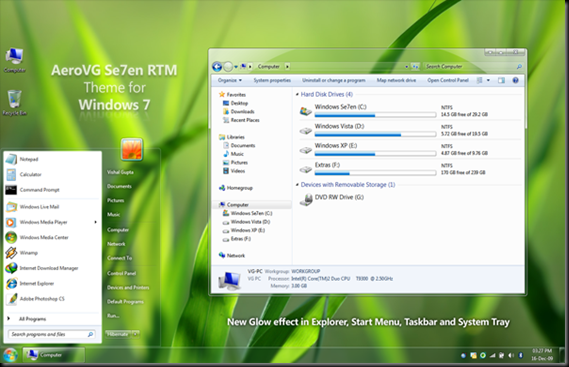
IMPORTANT:
If you are using previous Beta versions of "Aero Se7en" theme, then run "First Run Me.bat" file to delete previous Beta versions and install new RTM version of theme.
If you are not using any previous Beta version, simply run "Install Theme.exe" file to install and apply final version of "Aero Se7en" theme.
I hope you guys will like the final version.
You can download it using following link:
1. Download "Windowpaper XP" from following link:

2. Install the software and you can easily change the folder background and font colors:

DOWNLOAD LOTS OF KASPERSKY PRODUCT AND TOOLS FROM THIS FTP LINK BY KASPERSKY LAB :
DOWNLOAD KASPERSKY RESCUE DISK FROM FTP

If you tried the Betas of Kaspersky Anti-Virus 2011 or Kaspersky Internet Security 2011 and want to remove/uninstall them from your Windows, then here is a handy tool.
Kaspersky Lab Products Remover is an updated tool from Kaspersky which allows users to easily remove Kaspersky 2011 products completely from their system. The tool is specially designed to remove the new Kaspersky Antivirus & Internet Security 2011.
It is a small and portable tool, which comes in handy when you encounter errors or issues while deleting/uninstalling Kaspersky 2011 from Add/Remove Programs.

To completely Uninstall Kaspersky 2011 -
Download Kavremvr1.0.125 and run the .exe file. Enter the code as displayed in the image and Click the Remove button.

DOWNLOAD KASPERSKY 2010 PRODUCT REMOVEL TOOL
Removal utility allows uninstalling the following products:
Under 64-bit OS’s the removal utility can uninstall Kaspersky Anti-Virus 2009/2010 and Kaspersky Internet Security 2009/2010 only.
In order to fully uninstall the Kaspersky product:


