Saturday, April 19, 2014
How to Import Yahoo Mail Contact in Outlook
How to Activate Airtel Voicemail service for free on your Prepaid Mobile
- Call *321*671# for Activation
- Call *321*673# for Deactivation
- START VMS to 54321 for Activation
- STOP VMS to 54321 for Deactivation
- Change your language presence
- Set your Own Custom Voicemail Message
- Hear, Save and Delete the received voice mail messages
- Change Voice mail box name
- Delete – 3
- Reply – 4
- Save – 5
- Previous Voicemail – 6
- Replay Again – 7
- Next Voicemail – 8
- Settings – 9
- When you login to setting, Press 2 to change language presence
- Rename Mailbox Name – 3
- Change Password – 4
- Hear or Change current welcome message – 7
- Remove current Welcome Message – 8
Saturday, April 12, 2014
HOW TO SHOW BLANK CELL RED EXCEL CONDITIONAL FORMATTING
1. Select cells you want to format
2. On Home Ribbon go to Conditional Formatting --> Highlight Cells Rules --> More Rules...
3. In "New Formatting Rule" pop-up select "Format only cells that contain" option from "Select a Rule Type:" section
4. In same pop-up window select "Blanks" options from drop-down-list given under "Edit the Rule Description:" section
5. Again, in same pop-up window click "Format.." button to define type of formatting you wish and click "Ok" to close window
Sunday, May 26, 2013
Remove Background online from any Picture easily
There are plenty of simple photo editing web apps available online. For some basic things like increasing brightness, adding a text, etc., they are just fine but for editing or removing the background of an image, you need to go for a professional editor. Applications like Photoshop, Gimp, etc., are not easy to learn quickly. So today I came with an application called Clipping Magic, which helps you to remove the background of an image easily like never before. It is a pretty intelligent application, where you can use any type of image and remove its background with just few clicks. You don’t need to learn anything, it is very simple to use and understand.
Before you start, sign up for the application using your email id. It will be helpful in reviewing the images you have uploaded. So after you finish the sign up procedure you can just drag and drop or choose the file from your computer. Once you upload the picture, you can see a help box on the right side of your window which will explain how to use this application. It is pretty simple, there will be a green and a red brush in the application. Select the areas you want to remove using the red brush and select the one in green which you want to keep. Though this application is in alpha stage, the algorithm will understand your selection marks and remove the background of the picture.
If you want to make a fine selection on your image, you can choose the brush size in the menu bar. Also, you have some more options like choosing a background color, rotate the pictures, zoom in, zoom out, etc. Clipping magic application is really handy and simple to clear the backgrounds. Instead of struggling with complex photo editors, you can use this simple app to create transparent images. I’ve used this app for editing different type of images, the one I edited is in the screenshot above.
If there is different type of colors in the background, you need to select carefully because the app is still in the alpha stage so it takes time to detect those colors. Also you can see the changes based on your Internet speed, so if you have a slow connection you have to wait for the changes to reflect. These are the features and functions of Clipping magic web app. Feel free to share your experience with us in the comments and don’t forget to share this post with your friends.
Wednesday, April 10, 2013
Desktop management free software
Organizes desktop into customizable containers - showing folders (e.g.: local folders, network locations) contents, displayed as icons/thumbnails (generated with in-built thumbnail engine) on scrollable surface. Supported media formats can be quickly: previewed, listened, played using in-built multimedia front end. Other management features consist of file & folder rules, time & location based settings, labels and more.
Key features
Labels
Labels can be used to organize files & folders, by highlighting those with one of available colourful labels.Sorting
Files and folders can be sorted by name, extension, type, label, sub items count, times clicked, size, creation or last modification date.Container name label
Place type container can show customizable name label either on top or bottom of the container to help distinguish from each other.File and folder rules
Rules allow to copy or move new files and folders matching pattern or time range from/to desired location.Quick search
When typing in focused container it will be automatically scrolled to first query matching element by its name.Custom ordering
Elements can be rearranged and their order will be preserved.PlaceTime
It has support for dynamically changing supported settings and features for given location and time range.Sorting by content
Files and folders can be sorted by their content and grouped into sets of matching similiar: images, audio files, documents and other files.
- DOWNLOAD LINK
- http://mynimi.net/Projects/Download/Nimi-Places/
Saturday, April 6, 2013
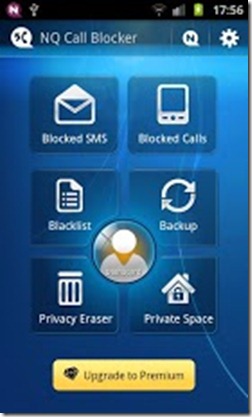
Free Android App to Block Calls
A must have on your New Year app list-- Call Blocker, to block unwanted calls and have a Peaceful New Year!
The latest Call Blocker with Premium features will be a good call filter just for you. We now support Chinese, English, German, French, Portugal and Spanish.
Have you ever wondered how to block those annoyed phone calls, or quickly back up your massive contact lists or just protect your privacy by not letting others see your phone call history or SMS?
Free Android Music Player App
This is a build of the 2.3 (Gingerbread) music app that supports Android 1.6 and higher.
Nothing fancy here, just providing everyone the option to use the Android Open Source Project (AOSP) developed music player. Not all phones come with this player installed.
For a free but more advanced and slick music player, check out JRT Studio’s newest music player, Rocket Player, which includes a built-in equalizer, genre view, lock screen support, and more!